
Using Teal AI Tool for Professional Resume Writing

The Mintly Team
July 21, 2025In today’s digital job market, your resume is often the first impression you make with potential employers. With competition higher than ever, creating a standout resume can be challenging. Many job seekers struggle with formatting, wording, and tailoring their resumes for different roles. Fortunately, artificial intelligence offers a solution.
Teal AI, a cutting-edge resume-building tool, is transforming how professionals craft their resumes—making the process faster, easier, and more effective.
In this blog post, we’ll explore how Teal AI works, its advantages, and step-by-step guidance on using it to create a polished, professional resume that helps you land your next big opportunity.
What Is Teal AI?
Teal AI is an advanced online platform that leverages artificial intelligence to help users design and write impactful resumes. Unlike traditional resume templates or generic builders, Teal AI uses smart algorithms to analyze your experience, skills, and target job descriptions. It delivers tailored content suggestions, formatting options, and even keyword optimization aligned with applicant tracking systems (ATS).
The platform is designed for everyone: students entering the workforce, experienced professionals seeking new roles, or anyone needing a resume update. Its user-friendly interface requires no technical knowledge—just input your information and let the AI guide you through the process.
Key Features and Benefits
1. Intelligent Content Suggestions
One of the biggest struggles in resume writing is knowing what to say and how to say it. HR technology has gone through massive AI redefinition. Teal AI analyzes your work history and suggests phrases, bullet points, and summaries that highlight your strengths. It helps you avoid common mistakes like vague descriptions or overused clichés.
2. ATS Optimization
Most companies now use applicant tracking systems to scan resumes for keywords before a human ever sees them. Teal AI ensures your resume includes relevant skills and terminology from your target job postings, increasing your chances of passing the initial screening.
3. Professional Formatting
A cluttered or inconsistent layout can quickly turn off hiring managers. Teal AI offers a range of modern, clean templates designed by professionals. The tool automatically adjusts spacing, font sizes, and section organization for maximum readability.
4. Customization for Each Application
Customizing your resume for different roles is crucial. Teal AI allows you to quickly tailor your content for each job application, ensuring you’re always putting your best foot forward.
5. Language and Tone Enhancement
The platform helps improve grammar, spelling, and overall tone—making sure your resume sounds confident and professional without being boastful.
6. Time Savings
Manual resume writing can take hours or even days to perfect. Teal AI streamlines the process so you can create multiple tailored resumes in less time.
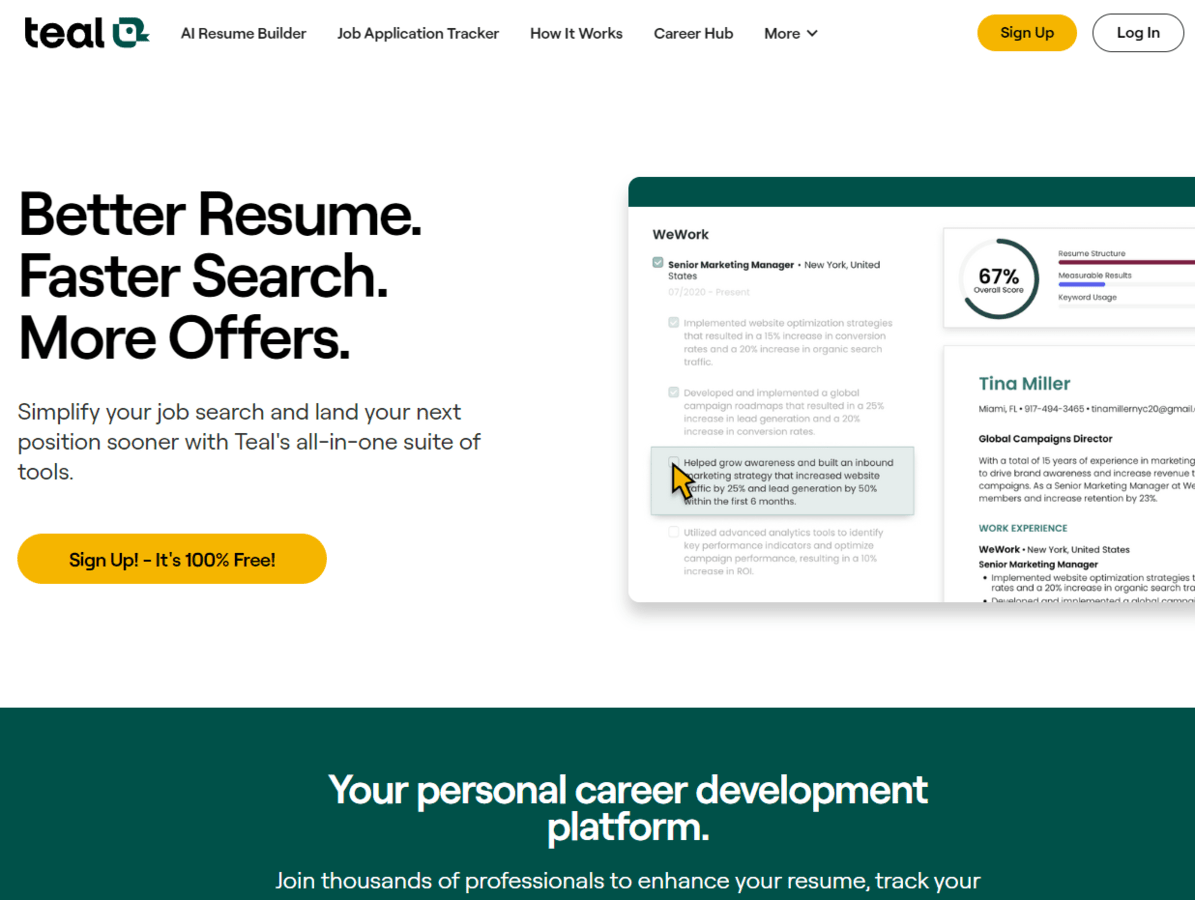
Step-by-Step Guide: Creating a Resume with Teal AI
Ready to try it out? Here’s how to use Teal AI to build a professional resume:
Step 1: Sign Up and Choose a Template
Go to the Teal AI website and create an account. Once logged in, browse through the available templates. Select one that matches your industry or personal style. Remember, a clean layout is usually best unless you’re in a creative field where more visual flair is acceptable.
Step 2: Input Personal Information
Enter your basic details: name, contact information, LinkedIn profile (if applicable), and any professional social media links. Make sure this section is accurate since it’s the first thing recruiters see.
Step 3: Add Work Experience
Input your previous jobs, including titles, companies, locations, and dates of employment. Teal AI will prompt you to describe your responsibilities and achievements. Here’s where the tool shines—it uses natural language processing to suggest strong action verbs and quantifiable results (e.g., “Increased sales by 30% through targeted outreach,” instead of “Responsible for sales outreach”).
Step 4: Highlight Education and Certifications
Enter your educational background: degrees earned, schools attended, graduation dates, and any relevant honors or coursework. If you have certifications or licenses (such as PMP, CPA, or specific software skills), add them here.
Step 5: Showcase Skills
List key skills relevant to your target role. Teal AI will analyze job descriptions you upload or paste into the platform, then recommend skills that recruiters are looking for (like “project management,” “data analysis,” or “team leadership”).
Step 6: Craft a Professional Summary
At the top of your resume, include a brief summary—2-3 sentences describing who you are professionally and what you offer. Teal AI generates suggestions based on your experience and target industry.
Example:
“Results-driven marketing specialist with 5+ years of experience in digital campaign management and brand strategy. Proven ability to increase engagement and revenue for tech startups.”
Step 7: Optimize for Keywords
Upload a job description for a role you’re interested in. Teal AI scans it for keywords and compares them to your resume content, suggesting adjustments so you’ll be more likely to pass ATS filters.
Step 8: Review Formatting
Preview your resume in different formats to see how it looks. Make sure headings stand out, experience is easy to scan, and there’s plenty of white space.
Step 9: Proofread and Finalize
While Teal AI checks for grammar and spelling errors automatically, always give your resume one last read-through yourself. Ask a friend or mentor to review it as well.
Step 10: Download or Share
Once satisfied, download your resume as a PDF or DOCX file. Many platforms also let you share a link directly with recruiters or hiring managers.
Best Practices When Using Teal AI
- Be Honest: Only include information that accurately reflects your experience.
- Quantify Achievements: Use numbers where possible (e.g., “Managed a team of 12,” “Reduced costs by 15%”).
- Tailor Each Resume: For every application, tweak your resume using Teal AI’s customization features.
- Keep It Concise: Aim for one page if possible (two pages maximum for those with extensive experience).
- Update Regularly: As you gain new skills or achievements, add them immediately so your resume stays current.
Who Should Use Teal AI?
Teal AI is ideal for:
- Recent graduates looking to create their first professional resume
- Experienced professionals seeking new roles or promotions
- Freelancers building portfolios for project-based work
- Career changers who need help translating skills to new industries
- Anyone who wants to save time without sacrificing quality
Final Thoughts
A great resume opens doors—but writing one can be daunting. Teal AI takes the guesswork out of resume creation by providing smart suggestions, professional formatting, and powerful keyword optimization. Whether you’re applying for your dream job or just updating your credentials, this tool helps you present yourself in the best light possible.
If you’re ready to take control of your career advancement with less stress and better results, give Teal AI a try. With its intelligent features and user-friendly design, you’ll spend less time worrying about wording and layout—and more time preparing for interviews.
All Tags
Loading...
Loading...